

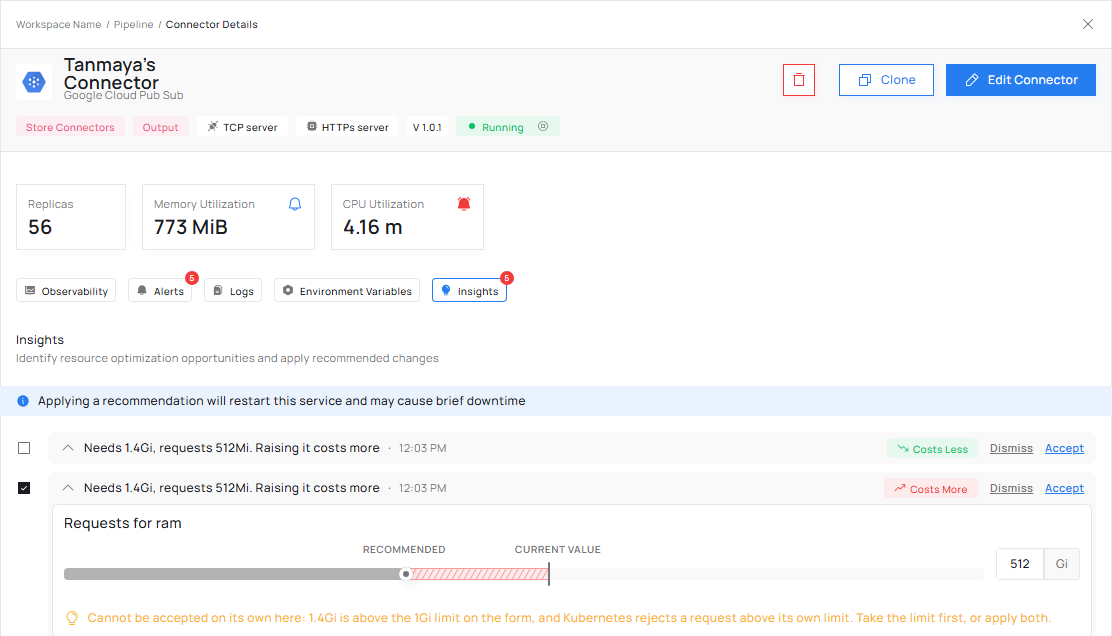
Recommendations carry a cost label: Costs Less, Costs More or No Cost.
- Failing now. Something is being stopped today.
- Exposed. Nothing is failing yet, but it will, or a neighbour is already paying for it.
- Cost only. Nothing is at risk and money is being spent on nothing.
Your connector needs more memory than it reserved
Failing now. Your invoice goes up. Your connector uses more memory than it reserved. Two things follow, and neither shows on a dashboard. Work is placed using the reserved figure, so a full node still looks as though it has room, and other workloads land there and slow down. And your own connector is eventually stopped mid-work for running out of memory, with nothing having warned you.- What it offers: Requests for RAM raised to the recommended size, and Limits for RAM recalculated to match.
- When it appears: Requests for RAM is below the recommended memory.
Your connector reserved more memory than it uses
Cost only. Your invoice goes down. Reserved memory is not shared. The difference is held for this connector, nothing else can use it, and it is on your invoice every month. Capacity is retired on what is reserved rather than on what is used, so a half empty node can look too full to switch off. Nothing is failing. It is money.- What it offers: Requests for RAM lowered to the recommended size, and Limits for RAM recalculated to match.
- When it appears: Requests for RAM is above the recommended memory.
Your connector uses more CPU than it reserved
Exposed. Your invoice goes up. The node is quietly over-committed, and the workload that pays for it is often somebody else’s: the one whose response times climb every evening with nothing in either looking broken. When the node is busy, your own connector is throttled, and response times spike. Running short of CPU makes a connector slow rather than stopping it, which is why this one is exposure rather than breakage.- What it offers: Requests for CPU raised to the recommended size, and Limits for CPU recalculated to match.
- When it appears: Requests for CPU is below the recommended CPU.
Your connector reserved far more CPU than it uses
Cost only. Your invoice goes down. Idle reserved CPU keeps half empty nodes alive, and other workloads are kept off the node by demand that is not real. Lowering the reservation frees that capacity and lets nodes be retired, which is where the saving comes from.- What it offers: Requests for CPU lowered to the recommended size, and Limits for CPU recalculated to match.
- When it appears: Requests for CPU is more than three times the recommended CPU. Three times is the default, and it can be set per workspace.
Your connector was stopped for running out of memory soon after it started
Failing now. The cost label shows which way your invoice moves. A connector that is stopped for memory minutes after it starts is a different problem from one that slowly outgrows its memory. A quick stop points at a spike while starting up, a leak while starting up, or a faulty configuration being loaded. More memory may hide the problem rather than fix it.- What it offers: Requests for RAM set to the recommended size, and Limits for RAM recalculated to match.
- When it appears: the connector was stopped for running out of memory, and it had been running for 10 minutes or less.
- What it warns: “This container died before serving real traffic. Investigate heap profile before applying.” A heap profile is a snapshot of what is holding memory inside your program.
One at a time
A figure cannot be both too low and too high. Memory and CPU therefore each show at most one of the too-low and too-high situations at a time.Next steps
Accept, dismiss or set your own
What you can do with a recommendation.
When Insights has nothing to say
The reasons a connector has no recommendation.