Why a connector can have no recommendation, which is usually good news, and what to do in each case.
A quiet Insights tab is a normal state, and usually the right one. It means none of the five situations is true for your connector right now. These are the reasons you might see nothing, in the order worth checking.
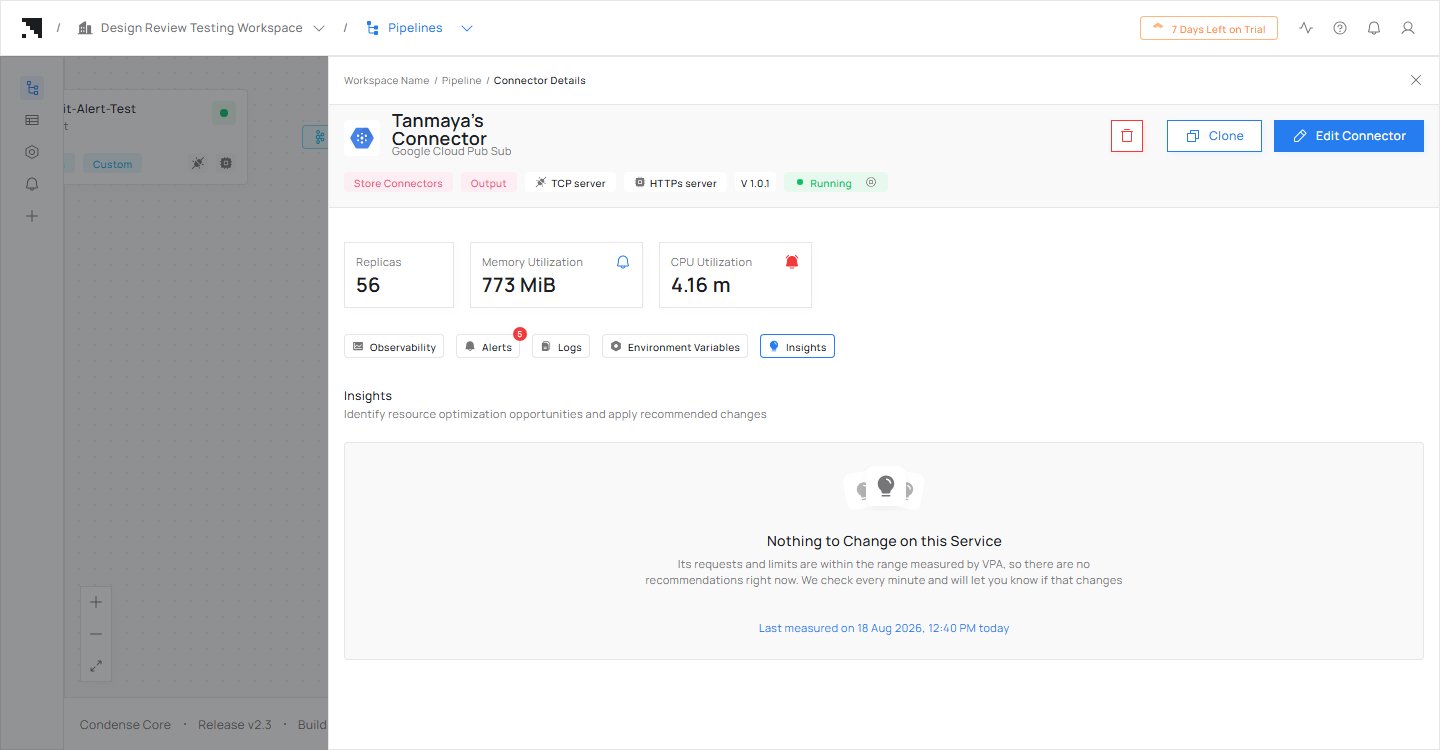
Nothing to change: the figures fit what the connector uses.
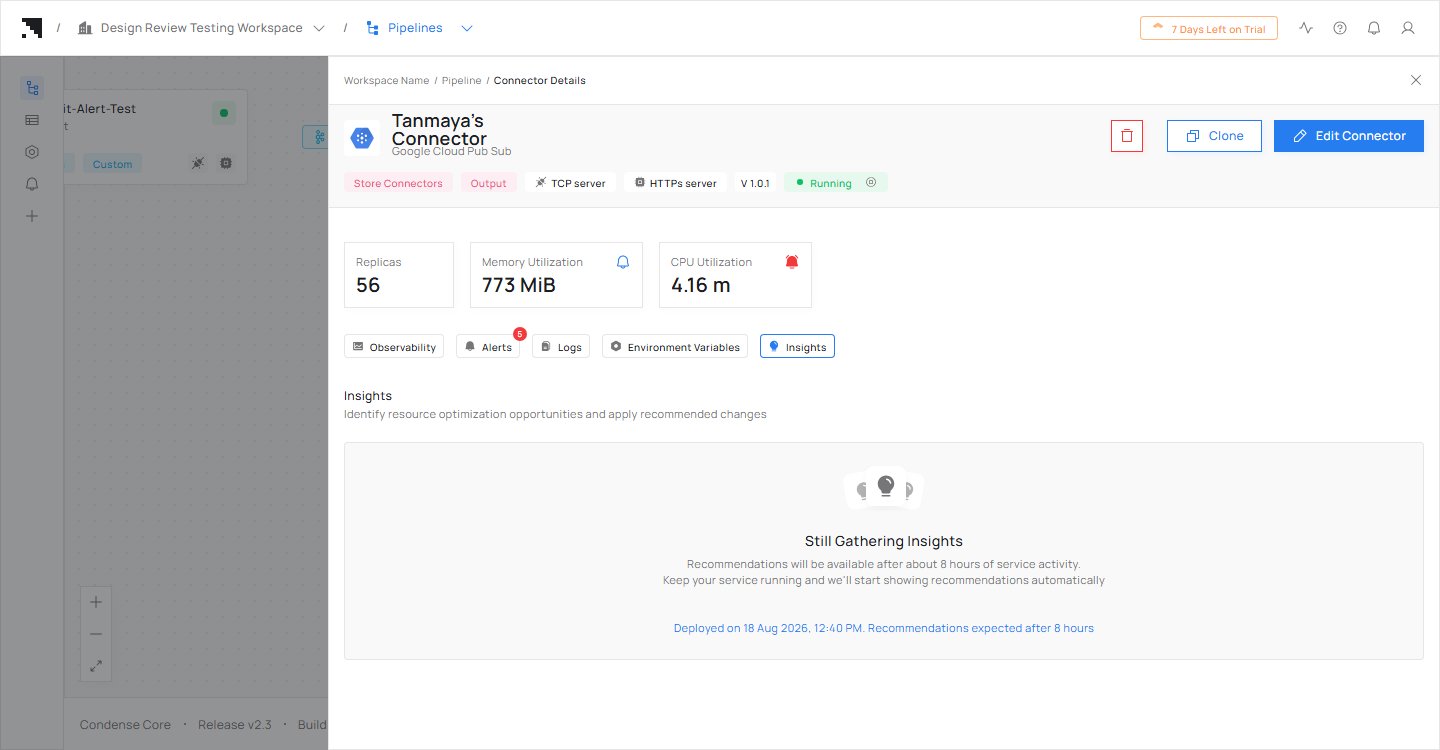
You deployed the connector recently
What you see: a message that Insights is still gathering, with the time you deployed and when to expect recommendations.What to do: wait. Watching starts when the connector starts, and the first recommendations come after about 8 minutes of the connector’s activity.
Still gathering: the tab says when to expect recommendations.
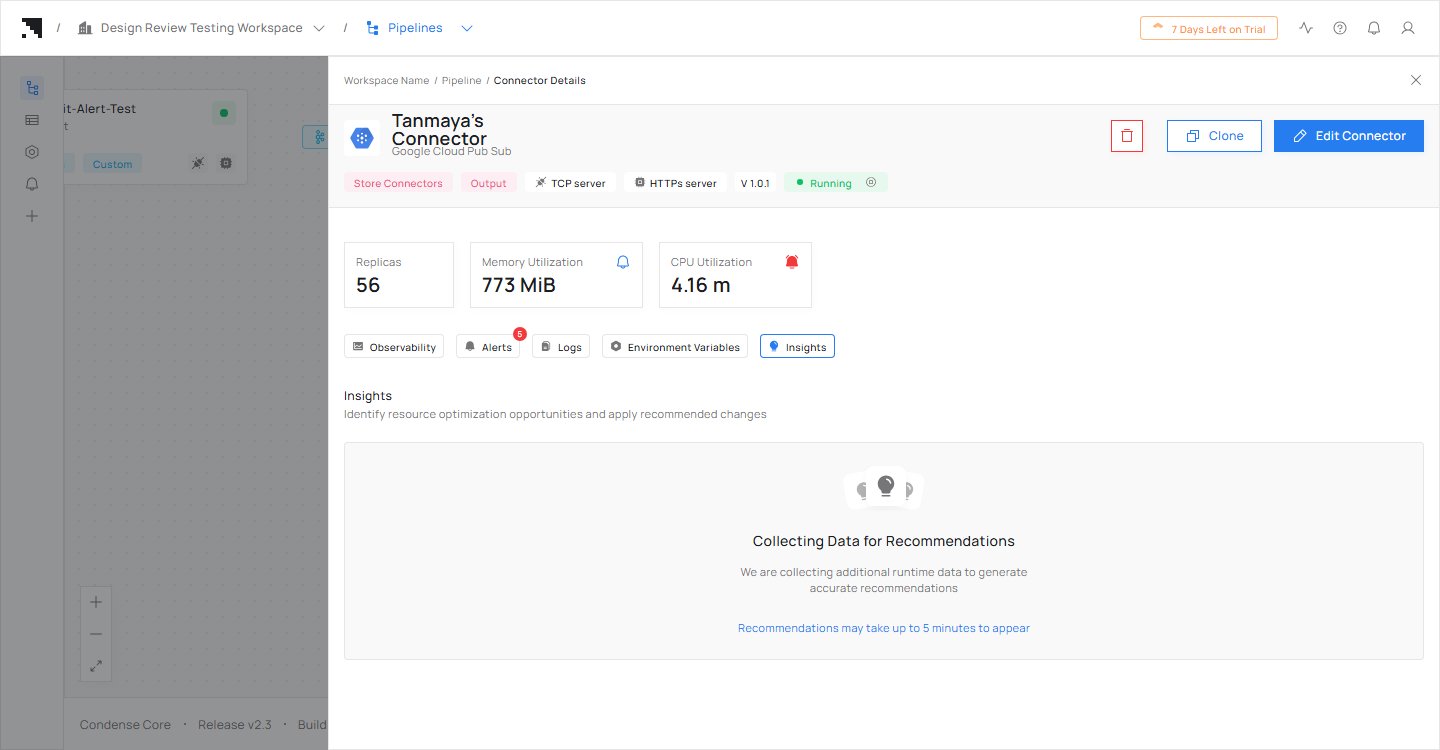
Insights is preparing your first recommendations
What you see: a message that Insights is collecting data, and that recommendations will appear shortly.What to do: wait. They appear on their own.
Collecting data: recommendations will appear shortly.
Your figures already fit
What you see: the message that there is nothing to change on this connector, and when it was last measured.What to do: nothing. This is the ordinary case for a connector that was sized sensibly. Insights keeps watching and will tell you if that changes.
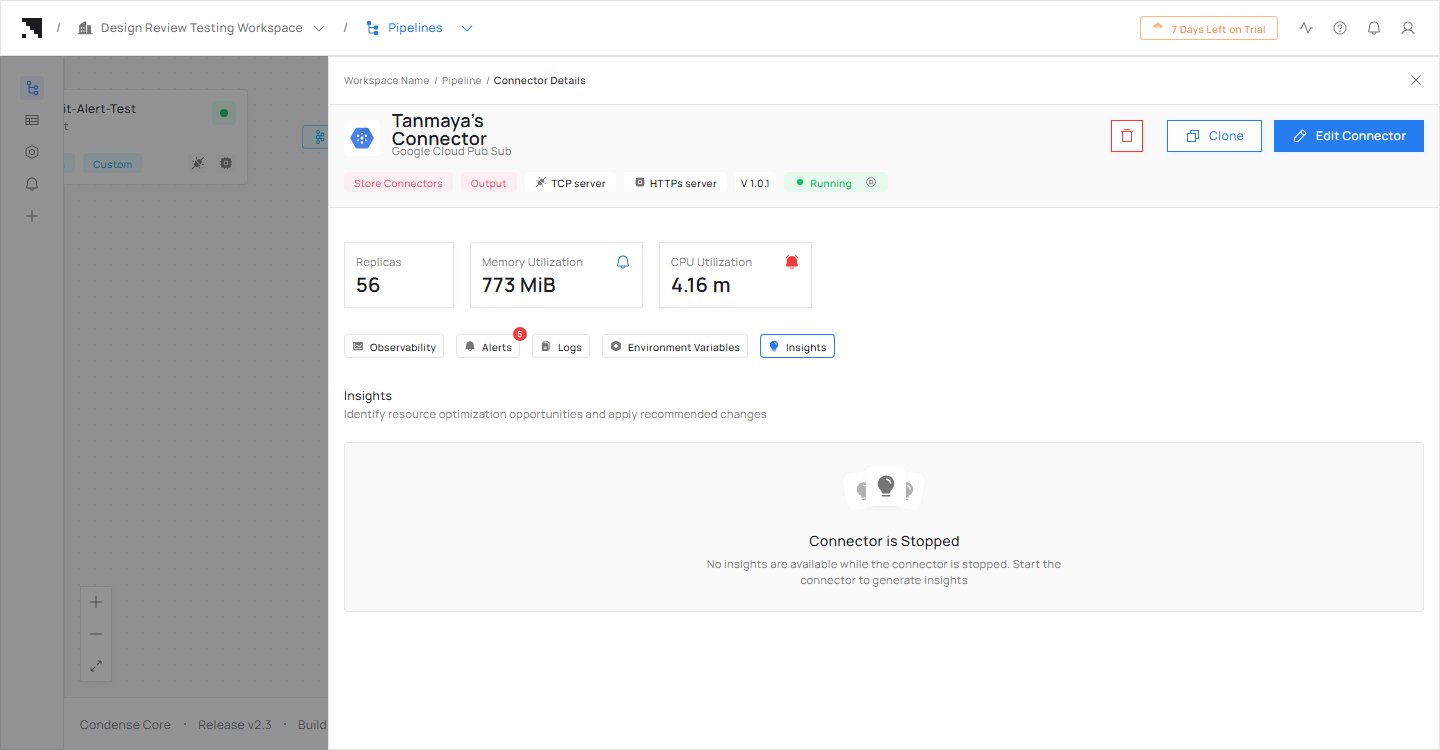
The connector is stopped
What you see: a message that no insights are available while the connector is stopped.What to do: start the connector, and insights come back. A stopped connector runs no copies, so nothing it does while working is being measured, and a figure worked out from an idle spell would under-size it on its first real traffic.
Stopped: no insights until the connector runs again.
The connector was stopped for more than eight days
What you see: the connector being gathered again, with no recommendations.What to do: wait. Memory history covers eight days, so a connector idle for longer than that is treated as a new one and waits for its first figures.
A field is already at the highest value the form accepts
What you see: the field listed with its current value written as text, and no suggestion.What to do: nothing on this screen. The recommendation says the field is where it should be rather than offering a change.
Somebody dismissed it
What you see: nothing on the tab for that connector.What to do: the recommendation comes back when the recommended figure changes. Until then, ask whoever dismissed it, or set the figures you want in Resource Configurations.
You cloned the connector
What you see: the cloned connector being gathered, even though the original has recommendations or says there is nothing to change.What to do: wait. A clone starts again as a new connector and is measured on its own. Its recommendations do not affect the original’s, and the original’s do not carry over.
You deleted the connector and deployed it again with the same name
What you see: the connector being gathered, with nothing under it.What to do: wait. It starts again as a new connector, and nothing anybody dismissed before carries over.
Your role can read but not deploy this connector
What you see: the recommendation and both figures, with no Accept and no Dismiss, and one line saying why.What to do: ask a teammate with the role that deploys it, which is Maintainer or Environment Admin.
{"docsConfig":{"theme":"almond","$schema":"https://mintlify.com/docs.json","name":"Condense","colors":{"primary":"#257df0","light":"#246CC9","dark":"#1557AF"},"logo":{"light":"https://mintcdn.com/zeliot/qgpulMbSGEGw0giR/images/CondenseLogoBlack.svg?fit=max\u0026auto=format\u0026n=qgpulMbSGEGw0giR\u0026q=85\u0026s=1caa8a86a89b5463fa28b8f003e10133","dark":"https://mintcdn.com/zeliot/qgpulMbSGEGw0giR/images/CondenseLogoWhite.svg?fit=max\u0026auto=format\u0026n=qgpulMbSGEGw0giR\u0026q=85\u0026s=2a3ea3d7fba3ceaf0386dce89421584e"},"favicon":{"light":"https://mintcdn.com/zeliot/Md377TOVctL0vVkB/images/CondenseIconBlack.svg?fit=max\u0026auto=format\u0026n=Md377TOVctL0vVkB\u0026q=85\u0026s=e863e6724b9c7686eb743276504404c0","dark":"https://mintcdn.com/zeliot/Md377TOVctL0vVkB/images/CondenseIconWhite.svg?fit=max\u0026auto=format\u0026n=Md377TOVctL0vVkB\u0026q=85\u0026s=9a71b9aa40253b26fafb20939edaec53"},"appearance":{"default":"light"},"background":{"color":{"light":"#FFFFFF","dark":"#1C1D21"}},"navbar":{"links":[{"href":"https://console.condense.zeliot.in/try-for-free?utm_source=website\u0026utm_medium=menu-button\u0026utm_campaign=try-for-free-p1","label":"Get Started with Condense"}]},"footer":{"socials":{"linkedin":"https://www.linkedin.com/company/realzeliot","x":"https://x.com/realzeliot","instagram":"https://www.instagram.com/zeliotofficial","youtube":"https://www.youtube.com/@zeliot_official","website":"https://www.zeliot.in/"},"links":[{"header":"Product","items":[{"label":"Condense","href":"https://www.zeliot.in/condense"},{"label":"Pricing","href":"https://www.zeliot.in/pricing"},{"label":"Try Now","href":"https://console-uat.condense.zeliot.in/try-now?utm_source=website\u0026utm_medium=footer-section\u0026utm_campaign=try-for-free-p1"},{"label":"Product Updates","href":"https://www.zeliot.in/condense/updates"}]},{"header":"Company","items":[{"label":"About","href":"https://www.zeliot.in/company/about-us"},{"label":"Partner Program","href":"https://www.zeliot.in/partners"},{"label":"Contact Us","href":"https://www.zeliot.in/contact"}]},{"header":"Resources","items":[{"label":"Blogs","href":"https://www.zeliot.in/blog"},{"label":"Developer Blogs","href":"https://www.zeliot.in/developer-blog"},{"label":"eBooks","href":"https://www.zeliot.in/data-streaming-resources/ebooks"},{"label":"Quick Links","href":"https://www.zeliot.in/quick-links"},{"label":"Built with Condense","href":"https://www.zeliot.in/interactive-games-built-using-condense"}]},{"header":"Legal","items":[{"label":"Terms \u0026 Conditions","href":"https://www.zeliot.in/terms-and-conditions"},{"label":"Security","href":"https://www.zeliot.in/security"},{"label":"Privacy Policy","href":"https://www.zeliot.in/privacy-policy"},{"label":"EULA","href":"https://zeliot.mintlify.app/condense/v2.4.0/legal/end-user-license-agreement-eula"}]}]},"seo":{"indexing":"all"},"fonts":{"family":"Manrope"},"icons":{"library":"tabler"},"contextual":{"options":["chatgpt","claude","perplexity","grok","aistudio","download-pdf"],"display":"header"},"interaction":{"drilldown":true},"styling":{"latex":false},"navigation":{"pages":[]}},"deployment":{"deploymentMetadataValue":{"subdomain":"zeliot","hasAudioNarration":false,"actualSubdomain":"zeliot","customDomains":["docs.condense.io"],"gitSource":{"type":"github","owner":"sachinkamath718","repo":"condense-docs","deployBranch":"main","contentDirectory":"","isPrivate":true,"mountPath":"","label":""},"feedback":{"thumbs":true},"entitlements":{"AI_CHAT":{"status":"DISABLED"}},"buildId":"6aef7ccdc526d2ff3f0666b6","clientVersion":"0.0.4087","searchFilterCounts":[{"language":"default","tag":"Build Pipeline","count":165},{"language":"default","tag":"connectors","count":138},{"language":"default","tag":"Connector catalog","count":129},{"language":"default","tag":"Deep Dive","count":102},{"language":"default","tag":"Connectors","count":91},{"language":"default","tag":"Fully Managed Kafka","count":85},{"language":"default","tag":"Available Connectors","count":81},{"language":"default","tag":"Overview","count":68},{"language":"default","tag":"Getting Started","count":45},{"language":"default","tag":"Legal","count":42}],"searchSettings":{"maxResults":7}},"assistantConfig":{"enableAskAiButton":false,"enableStarterQuestions":false,"enableContextualStarterQuestions":false,"enableAskAiSearchBar":true},"basePath":"","hasChatPermissions":false,"hasWebMcpPermissions":false,"toggles":[{"name":"kill-isr","enabled":true,"variant":{"name":"disabled","enabled":false,"feature_enabled":true},"impressionData":false},{"name":"agent-mintlify-slack","enabled":true,"variant":{"name":"disabled","enabled":false,"feature_enabled":true},"impressionData":false},{"name":"agent-integrations-settings","enabled":true,"variant":{"name":"disabled","enabled":false,"feature_enabled":true},"impressionData":false},{"name":"rbac-expansion","enabled":true,"variant":{"name":"disabled","enabled":false,"feature_enabled":true},"impressionData":false},{"name":"automations-pr-grouping","enabled":true,"variant":{"name":"disabled","enabled":false,"feature_enabled":true},"impressionData":false},{"name":"custom-prefix","enabled":true,"variant":{"name":"disabled","enabled":false,"feature_enabled":true},"impressionData":false},{"name":"analytics-v7","enabled":true,"variant":{"name":"disabled","enabled":false,"feature_enabled":true},"impressionData":false},{"name":"user-flows-analytics","enabled":true,"variant":{"name":"disabled","enabled":false,"feature_enabled":true},"impressionData":false},{"name":"no-publish-flow","enabled":true,"variant":{"name":"disabled","enabled":false,"feature_enabled":true},"impressionData":false},{"name":"workos-onboarding","enabled":true,"variant":{"name":"disabled","enabled":false,"feature_enabled":true},"impressionData":false},{"name":"llms-txt-v2","enabled":true,"variant":{"name":"disabled","enabled":false,"feature_enabled":true},"impressionData":false},{"name":"snapshot-serving-live","enabled":true,"variant":{"name":"disabled","enabled":false,"feature_enabled":true},"impressionData":false},{"name":"stripTemperatureMiddleware","enabled":true,"variant":{"name":"disabled","enabled":false,"feature_enabled":true},"impressionData":false},{"name":"support-platform-pylon-zendesk","enabled":true,"variant":{"name":"disabled","enabled":false,"feature_enabled":true},"impressionData":false},{"name":"snapshot-serving","enabled":true,"variant":{"name":"disabled","enabled":false,"feature_enabled":true},"impressionData":false},{"name":"instant-rollback","enabled":true,"variant":{"name":"disabled","enabled":false,"feature_enabled":true},"impressionData":false},{"name":"granular-notifications-server","enabled":true,"variant":{"name":"disabled","enabled":false,"feature_enabled":true},"impressionData":false},{"name":"granular-notifications","enabled":true,"variant":{"name":"disabled","enabled":false,"feature_enabled":true},"impressionData":false},{"name":"automations-fable","enabled":true,"variant":{"name":"disabled","enabled":false,"feature_enabled":true},"impressionData":false},{"name":"fixed-ai-action-pricing","enabled":true,"variant":{"name":"disabled","enabled":false,"feature_enabled":true},"impressionData":false},{"name":"automation-resolve-merge-conflict","enabled":true,"variant":{"name":"disabled","enabled":false,"feature_enabled":true},"impressionData":false},{"name":"scoped-publishing","enabled":true,"variant":{"name":"disabled","enabled":false,"feature_enabled":true},"impressionData":false},{"name":"mintql","enabled":true,"variant":{"name":"disabled","enabled":false,"feature_enabled":true},"impressionData":false},{"name":"page-level-analytics","enabled":true,"variant":{"name":"disabled","enabled":false,"feature_enabled":true},"impressionData":false},{"name":"editor-version-history-v2","enabled":true,"variant":{"name":"disabled","enabled":false,"feature_enabled":true},"impressionData":false},{"name":"billing-page-v2","enabled":true,"variant":{"name":"disabled","enabled":false,"feature_enabled":true},"impressionData":false},{"name":"full-page-search","enabled":true,"variant":{"name":"disabled","enabled":false,"feature_enabled":true},"impressionData":false},{"name":"workspace-projects","enabled":true,"variant":{"name":"disabled","enabled":false,"feature_enabled":true},"impressionData":false},{"name":"assistant-v5","enabled":true,"variant":{"name":"disabled","enabled":false,"feature_enabled":true},"impressionData":false},{"name":"fork-pr-previews","enabled":true,"variant":{"name":"disabled","enabled":false,"feature_enabled":true},"impressionData":false},{"name":"revalidation-jwt","enabled":true,"variant":{"name":"disabled","enabled":false,"feature_enabled":true},"impressionData":false},{"name":"workos-sso-scim","enabled":true,"variant":{"name":"disabled","enabled":false,"feature_enabled":true},"impressionData":false},{"name":"hobby-abuse-scan","enabled":true,"variant":{"name":"disabled","enabled":false,"feature_enabled":true},"impressionData":false},{"name":"dashboard-inbox","enabled":true,"variant":{"name":"disabled","enabled":false,"feature_enabled":true},"impressionData":false},{"name":"workos-signup","enabled":true,"variant":{"name":"disabled","enabled":false,"feature_enabled":true},"impressionData":false},{"name":"turbopuffer-dual-write","enabled":true,"variant":{"name":"disabled","enabled":false,"feature_enabled":true},"impressionData":false},{"name":"workos-enabled","enabled":true,"variant":{"name":"disabled","enabled":false,"feature_enabled":true},"impressionData":false},{"name":"approve-review-flow","enabled":true,"variant":{"name":"disabled","enabled":false,"feature_enabled":true},"impressionData":false},{"name":"editor-metadata","enabled":true,"variant":{"name":"disabled","enabled":false,"feature_enabled":true},"impressionData":false},{"name":"sso-setup-deadline-banner","enabled":true,"variant":{"name":"disabled","enabled":false,"feature_enabled":true},"impressionData":false},{"name":"turbopuffer-serve","enabled":true,"variant":{"name":"disabled","enabled":false,"feature_enabled":true},"impressionData":false},{"name":"live-agents","enabled":true,"variant":{"name":"disabled","enabled":false,"feature_enabled":true},"impressionData":false},{"name":"comment-mode","enabled":true,"variant":{"name":"disabled","enabled":false,"feature_enabled":true},"impressionData":false}],"googleFontsInlined":true},"customCss":[],"page":{"pagePath":"condense/v3.0.0/autoscaling/when-insights-has-nothing-to-say","slug":"/condense/v3.0.0/autoscaling/when-insights-has-nothing-to-say","pageMetadata":{"title":"When Insights has nothing to say","description":"Why a connector can have no recommendation, which is usually good news, and what to do in each case.","href":"/condense/v3.0.0/autoscaling/when-insights-has-nothing-to-say"},"description":{"compiledSource":"\"use strict\";\nconst {jsx: _jsx} = arguments[0];\nconst {useMDXComponents: _provideComponents} = arguments[0];\nfunction _createMdxContent(props) {\n const _components = {\n p: \"p\",\n ..._provideComponents(),\n ...props.components\n };\n return _jsx(_components.p, {\n children: \"Why a connector can have no recommendation, which is usually good news, and what to do in each case.\"\n });\n}\nfunction MDXContent(props = {}) {\n const {wrapper: MDXLayout} = {\n ..._provideComponents(),\n ...props.components\n };\n return MDXLayout ? _jsx(MDXLayout, {\n ...props,\n children: _jsx(_createMdxContent, {\n ...props\n })\n }) : _createMdxContent(props);\n}\nreturn {\n default: MDXContent\n};\n","frontmatter":{},"scope":{}},"pageType":"default","mdx":{"mdxSource":{"compiledSource":"\"use strict\";const{Fragment:_Fragment,jsx:_jsx,jsxs:_jsxs}=arguments[0];const{useMDXComponents:_provideComponents}=arguments[0];function _createMdxContent(props){const _components={p:`p`,strong:`strong`,..._provideComponents(),...props.components},{Accordion,AccordionGroup,Card,CardGroup,Frame,Heading,OptimizedImage}=_components;if(!Accordion)_missingMdxReference(`Accordion`,true);if(!AccordionGroup)_missingMdxReference(`AccordionGroup`,true);if(!Card)_missingMdxReference(`Card`,true);if(!CardGroup)_missingMdxReference(`CardGroup`,true);if(!Frame)_missingMdxReference(`Frame`,true);if(!Heading)_missingMdxReference(`Heading`,true);if(!OptimizedImage)_missingMdxReference(`OptimizedImage`,true);return _jsxs(_Fragment,{children:[_jsx(_components.p,{children:`A quiet Insights tab is a normal state, and usually the right one. It means none of the five situations is true for your connector right now. These are the reasons you might see nothing, in the order worth checking.`}),`\n`,_jsx(Frame,{caption:`Nothing to change: the figures fit what the connector uses.`,children:_jsx(OptimizedImage,{src:`https://mintcdn.com/zeliot/y_U2udoPb4Tq-45S/images/autoscaling/insights-nothing-to-change.png?fit=max\u0026auto=format\u0026n=y_U2udoPb4Tq-45S\u0026q=85\u0026s=39a4cf1cdb8ea08116f9ba3ce1f57d78`,alt:`The Insights tab showing Nothing to Change on this Service, with the time of the last measurement`,\"data-og-width\":`1440`,width:`1440`,\"data-og-height\":`750`,height:`750`,\"data-path\":`images/autoscaling/insights-nothing-to-change.png`,\"data-optimize\":`true`,\"data-opv\":`3`,srcset:`https://mintcdn.com/zeliot/y_U2udoPb4Tq-45S/images/autoscaling/insights-nothing-to-change.png?w=280\u0026fit=max\u0026auto=format\u0026n=y_U2udoPb4Tq-45S\u0026q=85\u0026s=741e1ab8cd8f44cbc3b13db1bfbcacae 280w, https://mintcdn.com/zeliot/y_U2udoPb4Tq-45S/images/autoscaling/insights-nothing-to-change.png?w=560\u0026fit=max\u0026auto=format\u0026n=y_U2udoPb4Tq-45S\u0026q=85\u0026s=8a0f572face737cbc681426b7a4efb22 560w, https://mintcdn.com/zeliot/y_U2udoPb4Tq-45S/images/autoscaling/insights-nothing-to-change.png?w=840\u0026fit=max\u0026auto=format\u0026n=y_U2udoPb4Tq-45S\u0026q=85\u0026s=70c5d85b8053e07769934f5848eafc0f 840w, https://mintcdn.com/zeliot/y_U2udoPb4Tq-45S/images/autoscaling/insights-nothing-to-change.png?w=1100\u0026fit=max\u0026auto=format\u0026n=y_U2udoPb4Tq-45S\u0026q=85\u0026s=355716b34b6d1f48ef9a64879ead85bc 1100w, https://mintcdn.com/zeliot/y_U2udoPb4Tq-45S/images/autoscaling/insights-nothing-to-change.png?w=1650\u0026fit=max\u0026auto=format\u0026n=y_U2udoPb4Tq-45S\u0026q=85\u0026s=f47c48264708da438ba30abc6acb8516 1650w, https://mintcdn.com/zeliot/y_U2udoPb4Tq-45S/images/autoscaling/insights-nothing-to-change.png?w=2500\u0026fit=max\u0026auto=format\u0026n=y_U2udoPb4Tq-45S\u0026q=85\u0026s=1f143e01aa172ba962f9127efbaf40f6 2500w`})}),`\n`,_jsxs(AccordionGroup,{children:[_jsxs(Accordion,{title:`You deployed the connector recently`,id:`you-deployed-the-connector-recently`,children:[_jsxs(_components.p,{children:[_jsx(_components.strong,{children:`What you see:`}),` a message that Insights is still gathering, with the time you deployed and when to expect recommendations.`]}),_jsxs(_components.p,{children:[_jsx(_components.strong,{children:`What to do:`}),` wait. Watching starts when the connector starts, and the first recommendations come after about 8 minutes of the connector’s activity.`]}),_jsx(Frame,{caption:`Still gathering: the tab says when to expect recommendations.`,children:_jsx(OptimizedImage,{src:`https://mintcdn.com/zeliot/y_U2udoPb4Tq-45S/images/autoscaling/insights-gathering.png?fit=max\u0026auto=format\u0026n=y_U2udoPb4Tq-45S\u0026q=85\u0026s=2f9b7d33737ad63346354bfddace098a`,alt:`The Insights tab showing Still Gathering Insights`,\"data-og-width\":`1440`,width:`1440`,\"data-og-height\":`750`,height:`750`,\"data-path\":`images/autoscaling/insights-gathering.png`,\"data-optimize\":`true`,\"data-opv\":`3`,srcset:`https://mintcdn.com/zeliot/y_U2udoPb4Tq-45S/images/autoscaling/insights-gathering.png?w=280\u0026fit=max\u0026auto=format\u0026n=y_U2udoPb4Tq-45S\u0026q=85\u0026s=02f389e39b042e78a579e3bf9fd842fe 280w, https://mintcdn.com/zeliot/y_U2udoPb4Tq-45S/images/autoscaling/insights-gathering.png?w=560\u0026fit=max\u0026auto=format\u0026n=y_U2udoPb4Tq-45S\u0026q=85\u0026s=42c1238ef7f463c08ec0446d7113aa76 560w, https://mintcdn.com/zeliot/y_U2udoPb4Tq-45S/images/autoscaling/insights-gathering.png?w=840\u0026fit=max\u0026auto=format\u0026n=y_U2udoPb4Tq-45S\u0026q=85\u0026s=616eb99e2b8062b9f291b9800855783e 840w, https://mintcdn.com/zeliot/y_U2udoPb4Tq-45S/images/autoscaling/insights-gathering.png?w=1100\u0026fit=max\u0026auto=format\u0026n=y_U2udoPb4Tq-45S\u0026q=85\u0026s=dc0abe44dcc643c06850015d47ab7107 1100w, https://mintcdn.com/zeliot/y_U2udoPb4Tq-45S/images/autoscaling/insights-gathering.png?w=1650\u0026fit=max\u0026auto=format\u0026n=y_U2udoPb4Tq-45S\u0026q=85\u0026s=cdf1b54623b9138fb78ad1b555a2bc86 1650w, https://mintcdn.com/zeliot/y_U2udoPb4Tq-45S/images/autoscaling/insights-gathering.png?w=2500\u0026fit=max\u0026auto=format\u0026n=y_U2udoPb4Tq-45S\u0026q=85\u0026s=305065de44206991f283863bc9c34085 2500w`})})]}),_jsxs(Accordion,{title:`Insights is preparing your first recommendations`,id:`insights-is-preparing-your-first-recommendations`,children:[_jsxs(_components.p,{children:[_jsx(_components.strong,{children:`What you see:`}),` a message that Insights is collecting data, and that recommendations will appear shortly.`]}),_jsxs(_components.p,{children:[_jsx(_components.strong,{children:`What to do:`}),` wait. They appear on their own.`]}),_jsx(Frame,{caption:`Collecting data: recommendations will appear shortly.`,children:_jsx(OptimizedImage,{src:`https://mintcdn.com/zeliot/y_U2udoPb4Tq-45S/images/autoscaling/insights-collecting.png?fit=max\u0026auto=format\u0026n=y_U2udoPb4Tq-45S\u0026q=85\u0026s=666d78737473edf740233feb9a0c8e98`,alt:`The Insights tab showing Collecting Data for Recommendations`,\"data-og-width\":`1440`,width:`1440`,\"data-og-height\":`750`,height:`750`,\"data-path\":`images/autoscaling/insights-collecting.png`,\"data-optimize\":`true`,\"data-opv\":`3`,srcset:`https://mintcdn.com/zeliot/y_U2udoPb4Tq-45S/images/autoscaling/insights-collecting.png?w=280\u0026fit=max\u0026auto=format\u0026n=y_U2udoPb4Tq-45S\u0026q=85\u0026s=3ccd91adb44e1cd9cdf0c9158302c76f 280w, https://mintcdn.com/zeliot/y_U2udoPb4Tq-45S/images/autoscaling/insights-collecting.png?w=560\u0026fit=max\u0026auto=format\u0026n=y_U2udoPb4Tq-45S\u0026q=85\u0026s=07bb7ff7d055ceab0f327a8e7466f3a8 560w, https://mintcdn.com/zeliot/y_U2udoPb4Tq-45S/images/autoscaling/insights-collecting.png?w=840\u0026fit=max\u0026auto=format\u0026n=y_U2udoPb4Tq-45S\u0026q=85\u0026s=a45972bda679f434ce140d633a463444 840w, https://mintcdn.com/zeliot/y_U2udoPb4Tq-45S/images/autoscaling/insights-collecting.png?w=1100\u0026fit=max\u0026auto=format\u0026n=y_U2udoPb4Tq-45S\u0026q=85\u0026s=a5ef608238e67461113caf52fac7f610 1100w, https://mintcdn.com/zeliot/y_U2udoPb4Tq-45S/images/autoscaling/insights-collecting.png?w=1650\u0026fit=max\u0026auto=format\u0026n=y_U2udoPb4Tq-45S\u0026q=85\u0026s=9c9f9efca4f8cb56b7d37b6ed2f369a4 1650w, https://mintcdn.com/zeliot/y_U2udoPb4Tq-45S/images/autoscaling/insights-collecting.png?w=2500\u0026fit=max\u0026auto=format\u0026n=y_U2udoPb4Tq-45S\u0026q=85\u0026s=50df62908e7f952d90abf110dabcad9b 2500w`})})]}),_jsxs(Accordion,{title:`Your figures already fit`,id:`your-figures-already-fit`,children:[_jsxs(_components.p,{children:[_jsx(_components.strong,{children:`What you see:`}),` the message that there is nothing to change on this connector, and when it was last measured.`]}),_jsxs(_components.p,{children:[_jsx(_components.strong,{children:`What to do:`}),` nothing. This is the ordinary case for a connector that was sized sensibly. Insights keeps watching and will tell you if that changes.`]})]}),_jsxs(Accordion,{title:`The connector is stopped`,id:`the-connector-is-stopped`,children:[_jsxs(_components.p,{children:[_jsx(_components.strong,{children:`What you see:`}),` a message that no insights are available while the connector is stopped.`]}),_jsxs(_components.p,{children:[_jsx(_components.strong,{children:`What to do:`}),` start the connector, and insights come back. A stopped connector runs no copies, so nothing it does while working is being measured, and a figure worked out from an idle spell would under-size it on its first real traffic.`]}),_jsx(Frame,{caption:`Stopped: no insights until the connector runs again.`,children:_jsx(OptimizedImage,{src:`https://mintcdn.com/zeliot/y_U2udoPb4Tq-45S/images/autoscaling/insights-stopped.png?fit=max\u0026auto=format\u0026n=y_U2udoPb4Tq-45S\u0026q=85\u0026s=9876b88184b47a3f497d04be7d70e699`,alt:`The Insights tab showing Connector is Stopped`,\"data-og-width\":`1440`,width:`1440`,\"data-og-height\":`750`,height:`750`,\"data-path\":`images/autoscaling/insights-stopped.png`,\"data-optimize\":`true`,\"data-opv\":`3`,srcset:`https://mintcdn.com/zeliot/y_U2udoPb4Tq-45S/images/autoscaling/insights-stopped.png?w=280\u0026fit=max\u0026auto=format\u0026n=y_U2udoPb4Tq-45S\u0026q=85\u0026s=cfee1234bd0fa15ac84648573ba3fd39 280w, https://mintcdn.com/zeliot/y_U2udoPb4Tq-45S/images/autoscaling/insights-stopped.png?w=560\u0026fit=max\u0026auto=format\u0026n=y_U2udoPb4Tq-45S\u0026q=85\u0026s=64586ba271541ace1f9e26b2b9626213 560w, https://mintcdn.com/zeliot/y_U2udoPb4Tq-45S/images/autoscaling/insights-stopped.png?w=840\u0026fit=max\u0026auto=format\u0026n=y_U2udoPb4Tq-45S\u0026q=85\u0026s=a4c252b4e950a8e1d46a35df08b2150b 840w, https://mintcdn.com/zeliot/y_U2udoPb4Tq-45S/images/autoscaling/insights-stopped.png?w=1100\u0026fit=max\u0026auto=format\u0026n=y_U2udoPb4Tq-45S\u0026q=85\u0026s=1bb999b7d007b26b0ef50ad6a8564ca5 1100w, https://mintcdn.com/zeliot/y_U2udoPb4Tq-45S/images/autoscaling/insights-stopped.png?w=1650\u0026fit=max\u0026auto=format\u0026n=y_U2udoPb4Tq-45S\u0026q=85\u0026s=94b785be9e5b5eb9bf9c2a1fe6e8be55 1650w, https://mintcdn.com/zeliot/y_U2udoPb4Tq-45S/images/autoscaling/insights-stopped.png?w=2500\u0026fit=max\u0026auto=format\u0026n=y_U2udoPb4Tq-45S\u0026q=85\u0026s=4295a70edbc4bf4adf8d82003888dd05 2500w`})})]}),_jsxs(Accordion,{title:`The connector was stopped for more than eight days`,id:`the-connector-was-stopped-for-more-than-eight-days`,children:[_jsxs(_components.p,{children:[_jsx(_components.strong,{children:`What you see:`}),` the connector being gathered again, with no recommendations.`]}),_jsxs(_components.p,{children:[_jsx(_components.strong,{children:`What to do:`}),` wait. Memory history covers eight days, so a connector idle for longer than that is treated as a new one and waits for its first figures.`]})]}),_jsxs(Accordion,{title:`A field is already at the highest value the form accepts`,id:`a-field-is-already-at-the-highest-value-the-form-accepts`,children:[_jsxs(_components.p,{children:[_jsx(_components.strong,{children:`What you see:`}),` the field listed with its current value written as text, and no suggestion.`]}),_jsxs(_components.p,{children:[_jsx(_components.strong,{children:`What to do:`}),` nothing on this screen. The recommendation says the field is where it should be rather than offering a change.`]})]}),_jsxs(Accordion,{title:`Somebody dismissed it`,id:`somebody-dismissed-it`,children:[_jsxs(_components.p,{children:[_jsx(_components.strong,{children:`What you see:`}),` nothing on the tab for that connector.`]}),_jsxs(_components.p,{children:[_jsx(_components.strong,{children:`What to do:`}),` the recommendation comes back when the recommended figure changes. Until then, ask whoever dismissed it, or set the figures you want in Resource Configurations.`]})]}),_jsxs(Accordion,{title:`You cloned the connector`,id:`you-cloned-the-connector`,children:[_jsxs(_components.p,{children:[_jsx(_components.strong,{children:`What you see:`}),` the cloned connector being gathered, even though the original has recommendations or says there is nothing to change.`]}),_jsxs(_components.p,{children:[_jsx(_components.strong,{children:`What to do:`}),` wait. A clone starts again as a new connector and is measured on its own. Its recommendations do not affect the original’s, and the original’s do not carry over.`]})]}),_jsxs(Accordion,{title:`You deleted the connector and deployed it again with the same name`,id:`you-deleted-the-connector-and-deployed-it-again-with-the-same-name`,children:[_jsxs(_components.p,{children:[_jsx(_components.strong,{children:`What you see:`}),` the connector being gathered, with nothing under it.`]}),_jsxs(_components.p,{children:[_jsx(_components.strong,{children:`What to do:`}),` wait. It starts again as a new connector, and nothing anybody dismissed before carries over.`]})]}),_jsxs(Accordion,{title:`Your role can read but not deploy this connector`,id:`your-role-can-read-but-not-deploy-this-connector`,children:[_jsxs(_components.p,{children:[_jsx(_components.strong,{children:`What you see:`}),` the recommendation and both figures, with no Accept and no Dismiss, and one line saying why.`]}),_jsxs(_components.p,{children:[_jsx(_components.strong,{children:`What to do:`}),` ask a teammate with the role that deploys it, which is Maintainer or Environment Admin.`]})]})]}),`\n`,_jsx(Heading,{level:`2`,id:`related`,children:`Related`}),`\n`,_jsxs(CardGroup,{cols:2,children:[_jsx(Card,{title:`How Insights follows your connector`,href:`/condense/v3.0.0/autoscaling/how-insights-follows-your-connector`,children:_jsx(_components.p,{children:`The whole journey, from deployment on.`})}),_jsx(Card,{title:`Limits and figures`,href:`/condense/v3.0.0/autoscaling/limits-and-figures`,children:_jsx(_components.p,{children:`The numbers behind these messages.`})})]})]})}function MDXContent(props={}){const{wrapper:MDXLayout}={..._provideComponents(),...props.components};return MDXLayout?_jsx(MDXLayout,{...props,children:_jsx(_createMdxContent,{...props})}):_createMdxContent(props)}return{default:MDXContent};function _missingMdxReference(id,component){throw new Error(`Expected `+(component?`component`:`object`)+\" `\"+id+\"` to be defined: you likely forgot to import, pass, or provide it.\")}","frontmatter":{},"scope":{"config":{},"pageMetadata":{"title":"When Insights has nothing to say","description":"Why a connector can have no recommendation, which is usually good news, and what to do in each case.","href":"/condense/v3.0.0/autoscaling/when-insights-has-nothing-to-say"}}},"mdxSourceWithNoJs":null},"mdxExtracts":{"tableOfContents":[{"title":"Related","slug":"related","depth":2,"children":[]}],"codeExamples":{}},"jsLinks":[],"subdomain":"zeliot","siteName":"Condense","title":"When Insights has nothing to say - Condense","navMaps":{"firstHrefInVersion":{"v2.5.0":{"href":"/condense/v2.5.0/spotlight/ai-agents","matchLevel":3},"v2.4.2":{"href":"/condense/v2.4.2/overview/build-your-first-pipeline","matchLevel":3},"v2.4.1":{"href":"/condense/v2.4.1/overview/build-your-first-pipeline","matchLevel":3},"v2.4.0":{"href":"/condense/v2.4.0/overview/build-your-first-pipeline","matchLevel":3},"Legacy":{"href":"/condense/legacy/overview/condense-documentation","matchLevel":3},"2.6.0":{"href":"/condense/v2.6.0/spotlight/ai-agents","matchLevel":3},"3.0.0":{"href":"/condense/v3.0.0/autoscaling/when-insights-has-nothing-to-say","matchLevel":0}},"firstHrefInLanguage":{}},"lastModified":"2026-11-06T18:20:55.515Z","originalFileLocation":"condense/v3.0.0/autoscaling/when-insights-has-nothing-to-say.mdx"},"headHtml":"\u003cscript data-mint-head>(function(){var d=document.documentElement,p=null;if(!p){try{p=localStorage.getItem(\"isDarkMode\")}catch(e){}if(p==='true')p='dark';else if(p==='false')p='light';if(p!=='light'\u0026\u0026p!=='dark'\u0026\u0026p!=='system')p=\"light\"}var r=p==='system'?(matchMedia(\"(prefers-color-scheme: dark)\").matches?'dark':'light'):p;d.classList.remove(r==='dark'?'light':'dark');d.classList.add(r);d.setAttribute(\"data-theme-preference\",p)})();\u003c/script>\u003cmeta data-mint-head name=\"description\" content=\"Why a connector can have no recommendation, which is usually good news, and what to do in each case.\">\u003cmeta data-mint-head name=\"application-name\" content=\"Condense\">\u003cmeta data-mint-head name=\"generator\" content=\"Mintlify\">\u003clink data-mint-head rel=\"icon\" type=\"image/png\" sizes=\"192x192\" href=\"/mintlify-assets/_mintlify/favicons/zeliot/VfNArsOcWOSIQ9z9/_generated/favicon/android-chrome-192x192.png\" media=\"(prefers-color-scheme: light)\">\u003clink data-mint-head rel=\"apple-touch-icon\" type=\"image/png\" sizes=\"180x180\" href=\"/mintlify-assets/_mintlify/favicons/zeliot/VfNArsOcWOSIQ9z9/_generated/favicon/apple-touch-icon.png\">\u003clink data-mint-head rel=\"icon\" type=\"image/png\" sizes=\"16x16\" href=\"/mintlify-assets/_mintlify/favicons/zeliot/VfNArsOcWOSIQ9z9/_generated/favicon/favicon-16x16.png\" media=\"(prefers-color-scheme: light)\">\u003clink data-mint-head rel=\"icon\" type=\"image/png\" sizes=\"32x32\" href=\"/mintlify-assets/_mintlify/favicons/zeliot/VfNArsOcWOSIQ9z9/_generated/favicon/favicon-32x32.png\" media=\"(prefers-color-scheme: light)\">\u003clink data-mint-head rel=\"shortcut icon\" type=\"image/x-icon\" href=\"/mintlify-assets/_mintlify/favicons/zeliot/VfNArsOcWOSIQ9z9/_generated/favicon/favicon.ico\" media=\"(prefers-color-scheme: light)\">\u003clink data-mint-head rel=\"icon\" type=\"image/png\" sizes=\"192x192\" href=\"/mintlify-assets/_mintlify/favicons/zeliot/VfNArsOcWOSIQ9z9/_generated/favicon-dark/android-chrome-192x192.png\" media=\"(prefers-color-scheme: dark)\">\u003clink data-mint-head rel=\"icon\" type=\"image/png\" sizes=\"16x16\" href=\"/mintlify-assets/_mintlify/favicons/zeliot/VfNArsOcWOSIQ9z9/_generated/favicon-dark/favicon-16x16.png\" media=\"(prefers-color-scheme: dark)\">\u003clink data-mint-head rel=\"icon\" type=\"image/png\" sizes=\"32x32\" href=\"/mintlify-assets/_mintlify/favicons/zeliot/VfNArsOcWOSIQ9z9/_generated/favicon-dark/favicon-32x32.png\" media=\"(prefers-color-scheme: dark)\">\u003clink data-mint-head rel=\"shortcut icon\" type=\"image/x-icon\" href=\"/mintlify-assets/_mintlify/favicons/zeliot/VfNArsOcWOSIQ9z9/_generated/favicon-dark/favicon.ico\" media=\"(prefers-color-scheme: dark)\">\u003cmeta data-mint-head property=\"og:title\" content=\"When Insights has nothing to say - Condense\">\u003cmeta data-mint-head property=\"og:description\" content=\"Why a connector can have no recommendation, which is usually good news, and what to do in each case.\">\u003cmeta data-mint-head property=\"og:site_name\" content=\"Condense\">\u003cmeta data-mint-head property=\"og:url\" content=\"https://docs.condense.io/condense/v3.0.0/autoscaling/when-insights-has-nothing-to-say\">\u003cmeta data-mint-head property=\"og:type\" content=\"website\">\u003cmeta data-mint-head property=\"og:image\" content=\"https://zeliot.mintlify.site/_mintlify/api/og/v2?division=Use+it\u0026amp;title=When+Insights+has+nothing+to+say\u0026amp;description=Why+a+connector+can+have+no+recommendation%2C+which+is+usually+good+news%2C+and+what+to+do+in+each+case.\u0026amp;theme=ec39576c3db1728434013807\u0026amp;signature=7c5498a533354244fb8cb6838872d0fa7958b4e0d11bd42160bf7244ae019c55\">\u003cmeta data-mint-head property=\"og:image:width\" content=\"1200\">\u003cmeta data-mint-head property=\"og:image:height\" content=\"630\">\u003cmeta data-mint-head name=\"twitter:card\" content=\"summary_large_image\">\u003cmeta data-mint-head name=\"twitter:title\" content=\"When Insights has nothing to say - Condense\">\u003cmeta data-mint-head name=\"twitter:description\" content=\"Why a connector can have no recommendation, which is usually good news, and what to do in each case.\">\u003cmeta data-mint-head name=\"twitter:image\" content=\"https://zeliot.mintlify.site/_mintlify/api/og/v2?division=Use+it\u0026amp;title=When+Insights+has+nothing+to+say\u0026amp;description=Why+a+connector+can+have+no+recommendation%2C+which+is+usually+good+news%2C+and+what+to+do+in+each+case.\u0026amp;theme=ec39576c3db1728434013807\u0026amp;signature=7c5498a533354244fb8cb6838872d0fa7958b4e0d11bd42160bf7244ae019c55\">\u003cmeta data-mint-head name=\"twitter:image:width\" content=\"1200\">\u003cmeta data-mint-head name=\"twitter:image:height\" content=\"630\">\u003cmeta data-mint-head name=\"msapplication-config\" content=\"/mintlify-assets/_mintlify/favicons/zeliot/VfNArsOcWOSIQ9z9/_generated/favicon/browserconfig.xml\">\u003cmeta data-mint-head name=\"apple-mobile-web-app-title\" content=\"Condense\">\u003cmeta data-mint-head name=\"msapplication-TileColor\" content=\"#257df0\">\u003clink data-mint-head rel=\"canonical\" href=\"https://docs.condense.io/condense/v3.0.0/autoscaling/when-insights-has-nothing-to-say\">\u003clink data-mint-head rel=\"alternate\" type=\"application/xml\" href=\"/sitemap.xml\">\u003clink data-mint-head rel=\"alternate\" type=\"text/markdown\" href=\"/condense/v3.0.0/autoscaling/when-insights-has-nothing-to-say.md\">\u003cscript data-mint-head type=\"application/ld+json\">{\"@context\":\"https://schema.org\",\"@graph\":[{\"@type\":\"Organization\",\"@id\":\"https://docs.condense.io/#organization\",\"name\":\"Condense\",\"url\":\"https://docs.condense.io\",\"logo\":{\"@type\":\"ImageObject\",\"url\":\"https://mintcdn.com/zeliot/qgpulMbSGEGw0giR/images/CondenseLogoBlack.svg?fit=max\u0026auto=format\u0026n=qgpulMbSGEGw0giR\u0026q=85\u0026s=1caa8a86a89b5463fa28b8f003e10133\"}},{\"@type\":\"WebSite\",\"@id\":\"https://docs.condense.io#website\",\"name\":\"Condense\",\"url\":\"https://docs.condense.io\",\"publisher\":{\"@id\":\"https://docs.condense.io/#organization\"}},{\"@type\":\"WebPage\",\"@id\":\"https://docs.condense.io/condense/v3.0.0/autoscaling/when-insights-has-nothing-to-say#webpage\",\"url\":\"https://docs.condense.io/condense/v3.0.0/autoscaling/when-insights-has-nothing-to-say\",\"name\":\"When Insights has nothing to say\",\"description\":\"Why a connector can have no recommendation, which is usually good news, and what to do in each case.\",\"dateModified\":\"2026-11-06T18:20:55.515Z\",\"isPartOf\":{\"@id\":\"https://docs.condense.io#website\"},\"breadcrumb\":{\"@id\":\"https://docs.condense.io/condense/v3.0.0/autoscaling/when-insights-has-nothing-to-say#breadcrumb\"}},{\"@type\":\"BreadcrumbList\",\"@id\":\"https://docs.condense.io/condense/v3.0.0/autoscaling/when-insights-has-nothing-to-say#breadcrumb\",\"itemListElement\":[{\"@type\":\"ListItem\",\"position\":1,\"name\":\"Autoscaling\",\"item\":\"https://docs.condense.io/condense/v3.0.0/autoscaling/overview\"},{\"@type\":\"ListItem\",\"position\":2,\"name\":\"Use it\",\"item\":\"https://docs.condense.io/condense/v3.0.0/autoscaling/choose-what-your-connector-reserves\"},{\"@type\":\"ListItem\",\"position\":3,\"name\":\"When Insights has nothing to say\",\"item\":\"https://docs.condense.io/condense/v3.0.0/autoscaling/when-insights-has-nothing-to-say\"}]},{\"@type\":[\"Article\",\"TechArticle\"],\"@id\":\"https://docs.condense.io/condense/v3.0.0/autoscaling/when-insights-has-nothing-to-say#article\",\"headline\":\"When Insights has nothing to say\",\"name\":\"When Insights has nothing to say\",\"description\":\"Why a connector can have no recommendation, which is usually good news, and what to do in each case.\",\"url\":\"https://docs.condense.io/condense/v3.0.0/autoscaling/when-insights-has-nothing-to-say\",\"mainEntityOfPage\":{\"@id\":\"https://docs.condense.io/condense/v3.0.0/autoscaling/when-insights-has-nothing-to-say#webpage\"},\"dateModified\":\"2026-11-06T18:20:55.515Z\",\"publisher\":{\"@id\":\"https://docs.condense.io/#organization\"},\"isPartOf\":{\"@id\":\"https://docs.condense.io#website\"}}]}\u003c/script>\u003cscript data-mint-head type=\"application/ld+json\">{\"@context\":\"https://schema.org\",\"@type\":\"WebSite\",\"name\":\"Condense\",\"creator\":{\"@type\":\"Organization\",\"name\":\"Mintlify\",\"url\":\"https://mintlify.com\"}}\u003c/script>","siteName":"Condense","nav":{"global":null,"versions":[{"version":"v2.5.0","pages":[{"title":"v2.5.0","href":"/condense/v2.5.0/spotlight/ai-agents"}]},{"version":"v2.4.2","pages":[{"title":"v2.4.2","href":"/condense/v2.4.2/overview/build-your-first-pipeline"}]},{"version":"v2.4.1","pages":[{"title":"v2.4.1","href":"/condense/v2.4.1/overview/build-your-first-pipeline"}]},{"version":"v2.4.0","pages":[{"title":"v2.4.0","href":"/condense/v2.4.0/overview/build-your-first-pipeline"}]},{"version":"Legacy","pages":[{"title":"Legacy","href":"/condense/legacy/overview/condense-documentation"}]},{"version":"2.6.0","pages":[{"title":"2.6.0","href":"/condense/v2.6.0/spotlight/ai-agents"}]},{"version":"3.0.0","default":true,"pages":[{"group":"Spotlight","icon":"cube-spark","pages":[{"title":"AI Agents ","href":"/condense/v3.0.0/spotlight/ai-agents"},{"title":"Bring Your Own Cloud","href":"/condense/v3.0.0/spotlight/bring-your-own-cloud"},{"title":"Building Streaming Pipelines: With vs. Without Condense","href":"/condense/v3.0.0/spotlight/building-streaming-pipelines"},{"title":"Explore Condense","href":"/condense/v3.0.0/spotlight/explore-condense"},{"title":"What's New in v3.0.0","href":"/condense/v3.0.0/spotlight/whats-new-in-3-0-0"}]},{"group":"Understanding Condense","pages":[{"title":"What is Condense","href":"/condense/v3.0.0/understanding-Condense/what-is-condense"},{"group":"Condense Architecture","pages":[{"title":"Condense Architecture","href":"/condense/v3.0.0/introduction-to-condense/condense-architecture-2"},{"title":"Additional Services","href":"/condense/v3.0.0/introduction-to-condense/condense-architecture/additional-services-2"},{"title":"Detailed Component Breakdown","href":"/condense/v3.0.0/introduction-to-condense/condense-architecture/detailed-component-breakdown-2"}]},{"group":"Industry","pages":[{"title":"Automotive OEM","href":"/condense/v3.0.0/understanding-Condense/industry/automotive-oem"},{"title":"Connected Mobility","href":"/condense/v3.0.0/understanding-Condense/industry/connected-mobility"},{"title":"Airport and Aviation","href":"/condense/v3.0.0/understanding-Condense/industry/airport-and-aviation"},{"title":"Electric Vehicle","href":"/condense/v3.0.0/understanding-Condense/industry/electric-vehicle"}]},{"title":"pricing-model","href":"/condense/v3.0.0/billing-and-pricing/pricing-model"}]},{"group":"Build Pipeline","pages":[{"title":"Build your First Pipeline","href":"/condense/v3.0.0/overview/build-your-first-pipeline-2"},{"title":"Connect any source","href":"/condense/v3.0.0/build-pipeline/connect-any-source"},{"group":"connectors","pages":[{"title":"Connectors in Condense","href":"/condense/v3.0.0/deep-dive/connectors/connectors-in-condense"},{"group":"Connector catalog","pages":[{"title":"Amazon SQS (Output, Stream)","href":"/condense/v3.0.0/deep-dive/connectors/available-connectors/amazon-sqs-stream-input"},{"title":"Apache Kafka (Output, Stream)","href":"/condense/v3.0.0/deep-dive/connectors/available-connectors/apache-kafka-output-stream"},{"title":"Azure Blob Storage (Output, Store)","href":"/condense/v3.0.0/deep-dive/connectors/available-connectors/azure-blob-storage-output-store"},{"title":"Azure Event Hubs (Input, Stream)","href":"/condense/v3.0.0/deep-dive/connectors/available-connectors/azure-events-hubs-input-stream"},{"title":"Azure Event Hubs (Output, Stream)","href":"/condense/v3.0.0/deep-dive/connectors/available-connectors/azure-events-hubs-output-stream"},{"title":"BigQuery (Output, Store)","href":"/condense/v3.0.0/deep-dive/connectors/available-connectors/big-query-output-store"},{"title":"ClickHouse (Output, Store)","href":"/condense/v3.0.0/deep-dive/connectors/available-connectors/click-house-output-store"},{"title":"Couchbase (Outpurt Store)","href":"/condense/v3.0.0/deep-dive/connectors/available-connectors/couchbase-outpurt-store"},{"title":"Data Simulator (Input, Stream)","href":"/condense/v3.0.0/deep-dive/connectors/available-connectors/data-simulator"},{"title":"Elasticsearch (Output, Stream)","href":"/condense/v3.0.0/deep-dive/connectors/available-connectors/elastic-search"},{"title":"Firebase Firestore (Input, Stream)","href":"/condense/v3.0.0/deep-dive/connectors/available-connectors/firebase-firesstore-input-stream"},{"title":"Firebase Firestore (Output, Stream)","href":"/condense/v3.0.0/deep-dive/connectors/available-connectors/firebase-firesstore-output-stream"},{"title":"Google Cloud Pub/Sub (Output, Stream)","href":"/condense/v3.0.0/deep-dive/connectors/available-connectors/google-cloud-pub-sub-output-stream"},{"title":"Google Cloud Pub/Sub (Input, Stream)","href":"/condense/v3.0.0/deep-dive/connectors/available-connectors/google-cloud-pub-sub"},{"title":"Google Cloud Spanner (Input, Store)","href":"/condense/v3.0.0/deep-dive/connectors/available-connectors/google-cloud-spanner-input-stream"},{"title":"Google Storage (Output, Store)","href":"/condense/v3.0.0/deep-dive/connectors/available-connectors/google-storage-output-store"},{"title":"HTTP (Input, Stream)","href":"/condense/v3.0.0/deep-dive/connectors/available-connectors/http-input-stream"},{"title":"HTTP (Output, Stream)","href":"/condense/v3.0.0/deep-dive/connectors/available-connectors/http-output-stream"},{"title":"iTriangle (Input, Stream)","href":"/condense/v3.0.0/deep-dive/connectors/available-connectors/i-triangle"},{"title":"IBM MQ (Input, Stream)","href":"/condense/v3.0.0/deep-dive/connectors/available-connectors/ibm-mq-input-stream"},{"title":"IBM MQ (Output, Stream)","href":"/condense/v3.0.0/deep-dive/connectors/available-connectors/ibm-mq-output-stream"},{"title":"Jimi Concox (Input, Stream)","href":"/condense/v3.0.0/deep-dive/connectors/available-connectors/jimi-concox"},{"title":"Kinesis (Input, Stream)","href":"/condense/v3.0.0/deep-dive/connectors/available-connectors/kinesis-input-stream"},{"title":"Kinesis (Output, Stream)","href":"/condense/v3.0.0/deep-dive/connectors/available-connectors/kinesis-output-stream"},{"title":"Microsoft SQL Server (Input, Store)","href":"/condense/v3.0.0/deep-dive/connectors/available-connectors/microsoft-sql-server"},{"title":"MongoDB (Output)","href":"/condense/v3.0.0/deep-dive/connectors/available-connectors/mongo-db-output-store"},{"title":"MongoDB (Input, Store)","href":"/condense/v3.0.0/deep-dive/connectors/available-connectors/mongo-input-store"},{"title":"MQTT (Output, Stream)","href":"/condense/v3.0.0/deep-dive/connectors/available-connectors/mqtt-output-stream"},{"title":"MySQL (Input, Store)","href":"/condense/v3.0.0/deep-dive/connectors/available-connectors/mysql-input-sore"},{"title":"MySQL (Output, Store)","href":"/condense/v3.0.0/deep-dive/connectors/available-connectors/mysql-output-sore"},{"title":"PostgreSQL (Input, Store)","href":"/condense/v3.0.0/deep-dive/connectors/available-connectors/postgressql-input-store"},{"title":"PostgreSQL (Output, Store)","href":"/condense/v3.0.0/deep-dive/connectors/available-connectors/postgressql-output-store"},{"title":"RabbitMQ (Input, Stream)","href":"/condense/v3.0.0/deep-dive/connectors/available-connectors/rabbitmq-input-stream"},{"title":"RabbitMQ (Output, Stream)","href":"/condense/v3.0.0/deep-dive/connectors/available-connectors/rabbitmq-output-stream"},{"title":"RIO (Input, Stream)","href":"/condense/v3.0.0/deep-dive/connectors/available-connectors/rio"},{"title":"Amazon S3 (Output, Store)","href":"/condense/v3.0.0/deep-dive/connectors/available-connectors/s3"},{"title":"SFTP (Output, Store)","href":"/condense/v3.0.0/deep-dive/connectors/available-connectors/sftp"},{"title":"Snowflake (Output, Store)","href":"/condense/v3.0.0/deep-dive/connectors/available-connectors/snowflake"},{"title":"Teltonika (Input, Telematics Device)","href":"/condense/v3.0.0/deep-dive/connectors/available-connectors/teltonika-input-telematics-device"},{"title":"Apache Kafka (Input, Stream)","href":"/condense/v3.0.0/deep-dive/connectors/available-connectors/apache-kafka-input-stream"},{"title":"Volvo Trucks (Input, Stream)","href":"/condense/v3.0.0/deep-dive/connectors/available-connectors/volvo-trucks-input-stream"},{"title":"Scania Cloud (Input)","href":"/condense/v3.0.0/deep-dive/connectors/available-connectors/scania-cloud-input"},{"title":"MQTT (Input, Stream)","href":"/condense/v3.0.0/deep-dive/connectors/available-connectors/mqtt-input-stream"}]},{"title":"Deploy input / output connectors","href":"/condense/v3.0.0/deep-dive/connectors/deploy-input-output-connectors"},{"title":"Clone Connector","href":"/condense/v3.0.0/deep-dive/connectors/clone-connector"}]},{"group":"Transform","pages":[{"title":"Transforms","href":"/condense/v3.0.0/transform/transforms"},{"title":"Data Utility","href":"/condense/v3.0.0/data-utility"},{"title":"Split Utility","href":"/condense/v3.0.0/splity-utility"},{"title":"Merge Utility","href":"/condense/v3.0.0/merge-utility"}]},{"group":"Custom Application","pages":[{"title":"Write code in the browser IDE","href":"/condense/v3.0.0/custom-application/write-code-in-the-browser-ide"},{"title":"GitHub \u0026 private version control","href":"/condense/v3.0.0/custom-application/github-and-private-version-control"},{"title":"Build, test \u0026 deploy","href":"/condense/v3.0.0/custom-application/build-test-and-deploy"}]}]},{"group":"Broker Registry","pages":[{"title":"Broker Registry","href":"/condense/v3.0.0/broker-registry/overview"},{"title":"Add a connection","href":"/condense/v3.0.0/broker-registry/add-a-connection"},{"title":"Broker types and authentication","href":"/condense/v3.0.0/broker-registry/broker-types"},{"title":"Test your connection","href":"/condense/v3.0.0/broker-registry/test-connection"},{"title":"Manage your connections","href":"/condense/v3.0.0/broker-registry/manage-connections"},{"group":"Reference","pages":[{"title":"Troubleshooting and security","href":"/condense/v3.0.0/broker-registry/troubleshooting"}]}]},{"group":"Alerts \u0026 Observability","pages":[{"title":"Configure SMTP for alert emails","href":"/condense/v3.0.0/alerts/smtp-configuration"},{"title":"Runtime alerts for connectors and transforms","href":"/condense/v3.0.0/alerts/observability-and-alerts"}]},{"group":"Autoscaling","pages":[{"group":"Start here","pages":[{"title":"Autoscaling","href":"/condense/v3.0.0/autoscaling/overview"},{"title":"How Insights follows your connector","href":"/condense/v3.0.0/autoscaling/how-insights-follows-your-connector"}]},{"group":"Use it","pages":[{"title":"Choose what your connector reserves","href":"/condense/v3.0.0/autoscaling/choose-what-your-connector-reserves"},{"title":"What Insights can tell you","href":"/condense/v3.0.0/autoscaling/what-insights-can-tell-you"},{"title":"Accept, dismiss or set your own","description":"What you can do with a recommendation: apply it in one click and restart once, dismiss it, or type a figure of your own. Who on your team can act, and what happens next.","href":"/condense/v3.0.0/autoscaling/accept-dismiss-or-set-your-own"},{"title":"When Insights has nothing to say","href":"/condense/v3.0.0/autoscaling/when-insights-has-nothing-to-say"}]},{"group":"Reference","pages":[{"title":"Limits and figures","description":"The numbers worth knowing about Insights: the highest values the form accepts, what each situation compares, and what one accept costs.","href":"/condense/v3.0.0/autoscaling/limits-and-figures"},{"title":"Best practices and pitfalls","href":"/condense/v3.0.0/autoscaling/best-practices-and-pitfalls"},{"title":"Glossary","href":"/condense/v3.0.0/autoscaling/glossary"}]}]},{"group":"Vapr AI","pages":[{"title":"What is Vapr","href":"/condense/v3.0.0/vapr-ai/what-is-vapr"},{"title":"Open Vapr","href":"/condense/v3.0.0/vapr/open-vapr"},{"group":"Application lifecycle","pages":[{"title":"Vapr across your application's lifecycle","href":"/condense/v3.0.0/vapr/overview"},{"title":"Meet the agents","href":"/condense/v3.0.0/vapr/meet-the-agents"},{"title":"Build a draft application","href":"/condense/v3.0.0/vapr/build-a-draft-app"},{"title":"Deploy with Vapr","href":"/condense/v3.0.0/vapr/deploy-with-vapr"},{"title":"Test your application","href":"/condense/v3.0.0/vapr/test-your-application"},{"title":"Monitor a running application","href":"/condense/v3.0.0/vapr/monitor"},{"title":"Stay in control","href":"/condense/v3.0.0/vapr/stay-in-control"}]},{"group":"AI Agents","icon":"sparkle-2","pages":[{"title":"Getting Started","href":"/condense/v3.0.0/ai-agents/getting-started"},{"title":"grafana-monitoring-agent","href":"/condense/v3.0.0/ai-agents/grafana-monitoring-agent"},{"title":"kubernetes-monitoring-agent","href":"/condense/v3.0.0/ai-agents/kubernetes-monitoring-agent"},{"title":"Kafka Agent","href":"/condense/v3.0.0/ai-agents/kafka-agent"},{"group":"Coding Agent","pages":[{"title":"Coding Agent","href":"/condense/v3.0.0/ai-agents/coding-agent"},{"title":"GitHub Integration","href":"/condense/v3.0.0/ai-agents/coding-agent/github-integration"}]}]}]},{"group":"Condense MCP","pages":[{"group":"Start here","pages":[{"title":"Condense MCP","href":"/condense/v3.0.0/mcp/overview"},{"title":"Quickstart","href":"/condense/v3.0.0/mcp/quickstart"}]},{"group":"Connect","pages":[{"title":"Connect your AI tool","sidebarTitle":"Connect your AI tool","href":"/condense/v3.0.0/mcp/connect-your-ai-tool"},{"title":"Sign in and approve access","href":"/condense/v3.0.0/mcp/sign-in-and-approve-access"},{"title":"Verify and reconnect","href":"/condense/v3.0.0/mcp/verify-and-reconnect"}]},{"group":"Use it","pages":[{"title":"Ask Condense MCP","href":"/condense/v3.0.0/mcp/ask-condense-mcp"},{"title":"Tool reference","href":"/condense/v3.0.0/mcp/tool-reference"},{"title":"Scope and permissions","href":"/condense/v3.0.0/mcp/scope-and-permissions"}]},{"group":"When it fails","pages":[{"title":"Errors and troubleshooting","href":"/condense/v3.0.0/mcp/errors-and-troubleshooting"}]},{"group":"Manage","pages":[{"title":"Your connected AI tools","href":"/condense/v3.0.0/mcp/your-connected-ai-tools"},{"title":"AI Governance","href":"/condense/v3.0.0/mcp/ai-governance"},{"title":"AI Access Management","href":"/condense/v3.0.0/mcp/ai-access-management"}]},{"group":"Reference","pages":[{"title":"Security and data handling","href":"/condense/v3.0.0/mcp/security-and-data-handling"},{"title":"Frequently asked questions","sidebarTitle":"FAQ","href":"/condense/v3.0.0/mcp/faq"}]}]},{"group":"Condense CLI","pages":[{"group":"Start here","pages":[{"title":"Condense CLI","href":"/condense/v3.0.0/cli/overview"},{"title":"Install","href":"/condense/v3.0.0/cli/install"},{"title":"Sign in","href":"/condense/v3.0.0/cli/sign-in"},{"title":"Concepts","href":"/condense/v3.0.0/cli/concepts"},{"title":"Quickstart","href":"/condense/v3.0.0/cli/quickstart"}]},{"group":"Commands","pages":[{"title":"Environments and workspaces","href":"/condense/v3.0.0/cli/environments-and-workspaces"},{"title":"Deploy and move","href":"/condense/v3.0.0/cli/deploy-and-move"},{"title":"Monitor","href":"/condense/v3.0.0/cli/monitor"},{"title":"Manage","href":"/condense/v3.0.0/cli/manage"}]},{"group":"Reference","pages":[{"title":"Command reference","href":"/condense/v3.0.0/cli/command-reference"},{"title":"Targeting and configuration","href":"/condense/v3.0.0/cli/targeting-and-configuration"},{"title":"Output and scripting","href":"/condense/v3.0.0/cli/output-and-scripting"},{"title":"Troubleshooting","href":"/condense/v3.0.0/cli/troubleshooting"}]}]},{"group":"Users and access","pages":[{"title":"Sign up and sign in","href":"/condense/v3.0.0/condense-guide/condense-console/sign-up-and-sign-in"},{"title":"Invite Members","href":"/condense/v3.0.0/condense-guide/condense-console/invite-members"}]},{"group":"Plans and upgrading","pages":[{"title":"Plans and upgrading","href":"/condense/v3.0.0/plans-and-upgrading/overview"},{"title":"Where to start an upgrade","href":"/condense/v3.0.0/plans-and-upgrading/where-to-start"},{"title":"The Upgrade plan window","href":"/condense/v3.0.0/plans-and-upgrading/upgrade-window"},{"title":"Who can upgrade","href":"/condense/v3.0.0/plans-and-upgrading/who-can-upgrade"},{"title":"Talk to Sales","href":"/condense/v3.0.0/plans-and-upgrading/talk-to-sales"},{"title":"After your plan changes","href":"/condense/v3.0.0/plans-and-upgrading/after-the-upgrade"},{"group":"Reference","pages":[{"title":"Questions and answers","href":"/condense/v3.0.0/plans-and-upgrading/faq"}]}]},{"group":"Help and Support","pages":[{"title":"Video Guides","href":"/condense/v3.0.0/help-and-support/video-guide"}]},{"group":"Security and Compliance","pages":[{"title":"Security model","href":"/condense/v3.0.0/MISSING-untitled-page-49"},{"title":"Securing Kafka","href":"/condense/v3.0.0/security-and-compliance/securing-kafka"},{"title":"Access Control List","href":"/condense/v3.0.0/security-and-compliance/access-control-list"},{"title":"Activity Auditor","href":"/condense/v3.0.0/security-and-compliance/activity-auditor"},{"title":"Certifications \u0026 data privacy","href":"/condense/v3.0.0/security-and-compliance/certifications-and-data-privacy"},{"title":"Legal \u0026 terms","href":"/condense/v3.0.0/security-and-compliance/legal-and-terms"},{"title":"Security \u0026 architecture packet","href":"/condense/v3.0.0/security-and-compliance/security-and-architecture-packet"}]},{"group":"Legal","icon":"bookmark","pages":[{"title":"End User License Agreement (EULA)","href":"/condense/v3.0.0/legal/end-user-license-agreement-eula"},{"title":"Privacy Policy","href":"/condense/v3.0.0/legal/privacy-policy"},{"title":"Usage of Cookies","href":"/condense/v3.0.0/legal/usage-of-cookies"},{"title":"Terms and Conditions","href":"/condense/v3.0.0/legal/terms-and-conditions"},{"title":"Terms of Use","href":"/condense/v3.0.0/legal/terms-of-use"},{"title":"Support Terms","href":"/condense/v3.0.0/legal/support-terms"}]},{"group":"Certification","pages":[{"title":"ISO 9001:2015","href":"/condense/v3.0.0/certifications/iso-9001-2015"},{"title":"ISO/IEC 27001:2022","href":"/condense/v3.0.0/certifications/iso-iec-27001-2022"},{"title":"AICPA SOC 2","href":"/condense/v3.0.0/certifications/aicpa-soc-2"}]},{"group":"Fully Managed Kafka","icon":"blocks","pages":[{"title":"fully-managed-kafka","href":"/condense/v3.0.0/fully-managed-kafka"},{"title":"Kafka Management","href":"/condense/v3.0.0/fully-managed-kafka/kafka-management"},{"title":"Kafka Topics","href":"/condense/v3.0.0/fully-managed-kafka/kafka-topics"},{"title":"Kafka Connect","href":"/condense/v3.0.0/fully-managed-kafka/kafka-connect"},{"title":"Schema Registry","href":"/condense/v3.0.0/fully-managed-kafka/schema-registry"},{"title":"Securing Kafka","href":"/condense/v3.0.0/fully-managed-kafka/securing-kafka"},{"title":"Kafka Administration","href":"/condense/v3.0.0/fully-managed-kafka/kafka-administration"},{"title":"ksqlDB","href":"/condense/v3.0.0/fully-managed-kafka/untitled-page-1"}]}]}]},"basePath":"","title":"When Insights has nothing to say - Condense","buildId":"dpl_FWZhTb2vab28gFGFH4ojka6qEznQ","deploymentId":"dpl_FWZhTb2vab28gFGFH4ojka6qEznQ","dynamics":["07c022d89b","a74be98ba7"],"chunks":["Frame-CXMGc493.js","DynamicMarkdown-D-2HDKEp.js","zoom-image-lightbox-CE4cYsJE.js","lightbox-handle-r17bVUz3.js"]}