

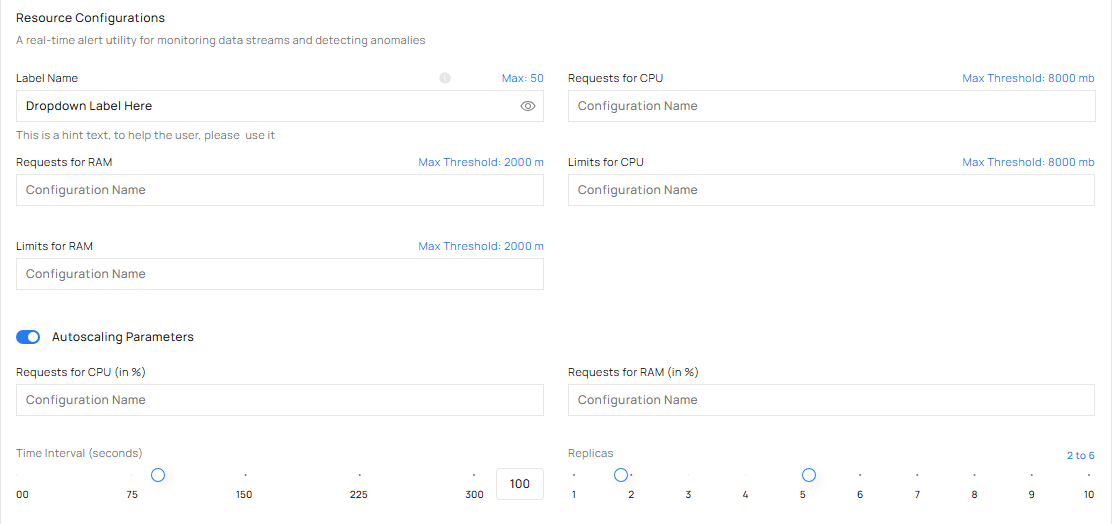
Resource Configurations: the four figures, and Autoscaling Parameters for the number of copies.
Requests for CPU
Reserves CPU for each copy of your connector.- Too low: the node is over-committed, and your connector and its neighbours slow down under load.
- Too high: reserved CPU sits idle, and nodes stay on that could have been switched off.
- Highest it accepts: 2000 m.
Limits for CPU
Caps how much CPU each copy may use.- Too low: your connector is held back and runs slower than the node could let it run.
- Too high: one spike can crowd out everything else on the same node.
- Highest it accepts: 2000 m.
Requests for RAM
Reserves memory for each copy.- Too low: a full node still looks as though it has room, so work lands there and slows down.
- Too high: memory nothing uses is still reserved, and still charged.
- Highest it accepts: 8000 Mib.
Limits for RAM
Caps how much memory each copy may use before it is stopped.- Too low: your connector is stopped for passing its cap while it still had work to do.
- Too high: nothing contains a climb in memory, and the node stops other workloads to survive.
- Highest it accepts: 8000 Mib.
If you do not know the figures yet
That is the normal starting point. Enter something sensible and let the first recommendation correct it. That is what Insights is for. You can:- Enter your own figures for all four fields.
- Leave the defaults and correct them later from a recommendation.
How many copies run
The same section has Autoscaling Parameters, where you set the range of replicas Condense may run, for example 2 to 6. Condense moves the number of copies up and down inside that range without asking you. It is a separate decision from the four figures above: replicas change how many copies there are, the figures change how big each copy is.Next steps
What Insights can tell you
The five situations it speaks up about.
Limits and figures
The numbers worth knowing, in one place.