

Before you deploy
Nothing is measured yet, so the four figures are your best guess. A guess is fine. The first recommendation exists to correct it. If you do not know what to enter, enter something sensible. A generous placeholder is safe, but you keep paying for it until you act on the recommendation to lower it. See Choose what your connector reserves.When your connector starts
Watching begins on its own. What you will not have straight away is a recommendation. Insights needs about 8 minutes of your connector’s activity first, so until then the Insights tab says it is still gathering, shows when you deployed, and says when to expect recommendations.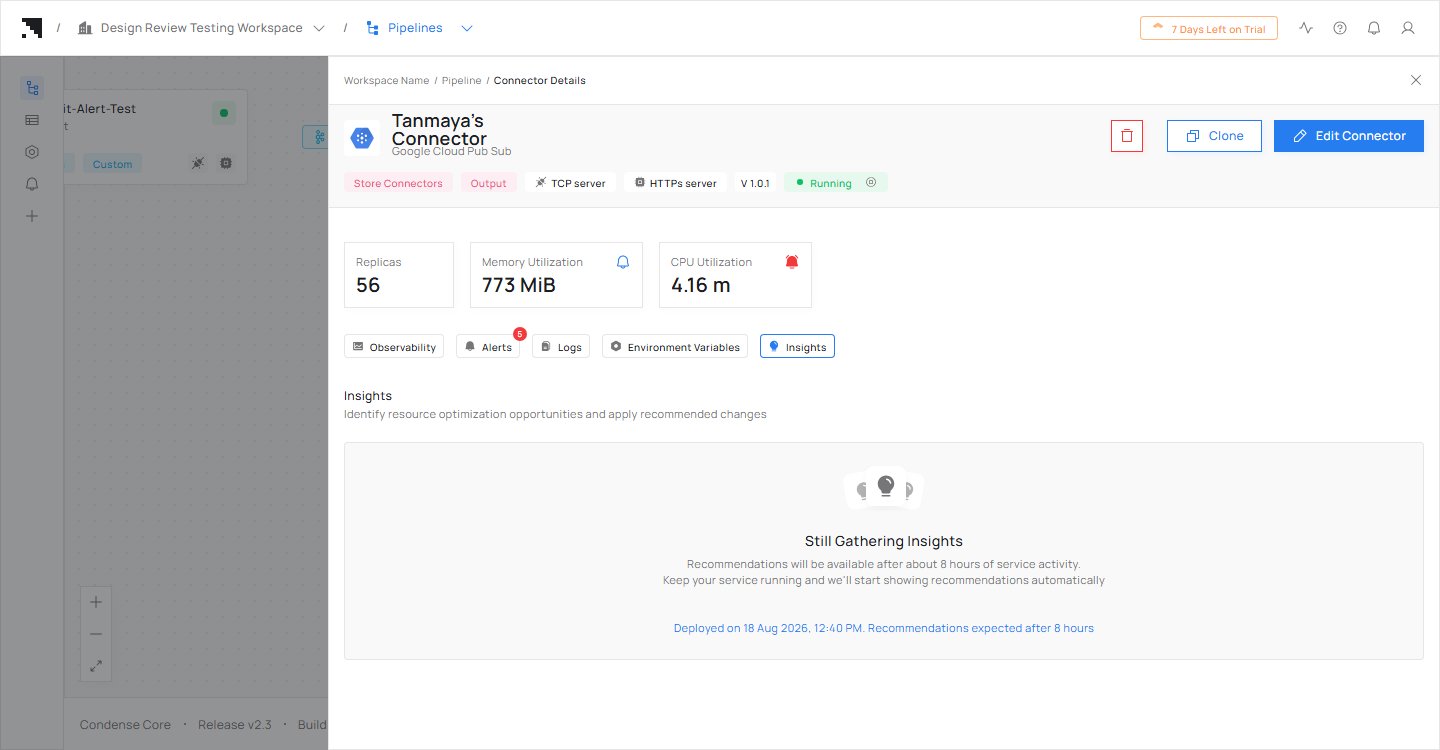
The Insights tab at the start: still gathering, with the time to expect recommendations.
While it runs
Insights compares two things: the figures you entered, and the figures Condense recommends from what your connector has actually used. The Insights tab keeps up as either side changes, so you do not need to refresh it. You can read both figures on the Insights tab whenever you like, even when nothing is being recommended.When something is worth changing
A recommendation appears on the Insights tab, a count shows on the tab, a lightbulb shows on the connector’s card, and you are told once. You are not told again because the same thing is still true. A recommendation is a state, not an alert: it appears when one of the situations is true, stays while it is true, and goes away by itself when it is not. See What Insights can tell you.After you accept
Your connector is updated and restarts once. The deployment form shows the figures you accepted, and the recommendation is withdrawn once your figures fit again. If the same situation comes back later, you get a new recommendation, not a queue of them. See Accept, dismiss or set your own.Next steps
Choose what your connector reserves
Set the four figures well from the start.
When Insights has nothing to say
Why a quiet Insights tab is usually good news.